
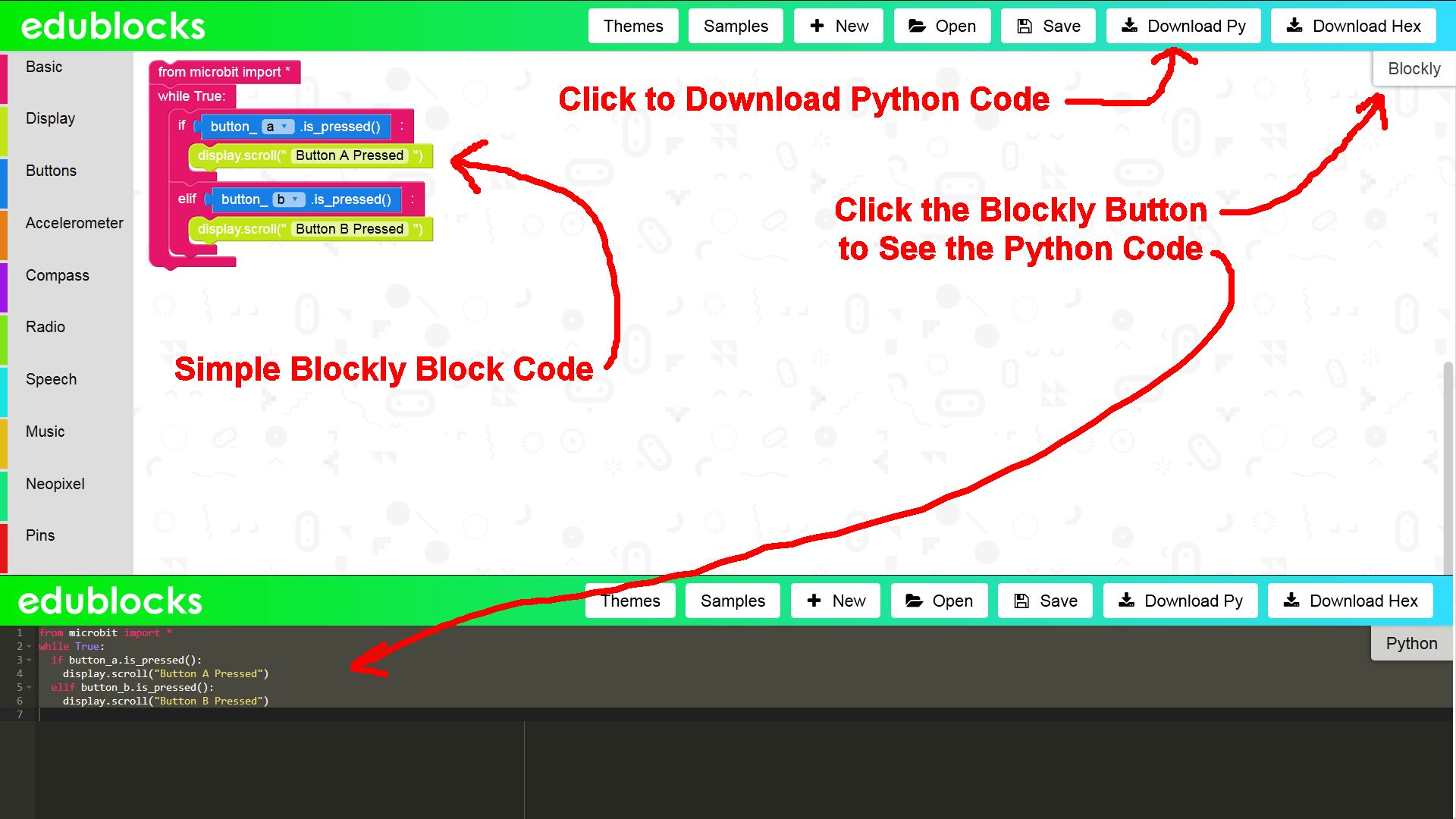
EduBlocks Example Button Code
The EduBlocks can be converted into pure Python code, demonstrating how the EduBlocks blocks (which are similar in design to Scratch blocks) relate to the syntax of a text based programming language.
Below is the content of the Downloaded py file:
from microbit import *
 while True:
   if button_a.is_pressed():
     display.scroll("Button A Pressed")
   elif button_b.is_pressed():
     display.scroll("Button B Pressed")
Python is a good choice for a language to transition to from Scratch since Python function names tend to be easy to understand and it’s possible to break Python code into a block like format.
Continue Reading EduBlocks Programming Tool - Transition from Scratch to Python


Arduino Uno Thermometer Project with LM35 Sensor and LCD Display #Arduino #Hackerspace #Project...
If Then Else Statements #programming #coding...
Google Blockly #Blockly #Javascript #Coding...
Visual Programming Language Blocks: Scratch, Blockly, MIT App Inventor 2 #MIT #Coding #Scratch #Blockly...
Raspberry Pi vs Arduino Uno #RaspberryPi #Arduino...
Computing Education in Schools #Computing #Education #School...