
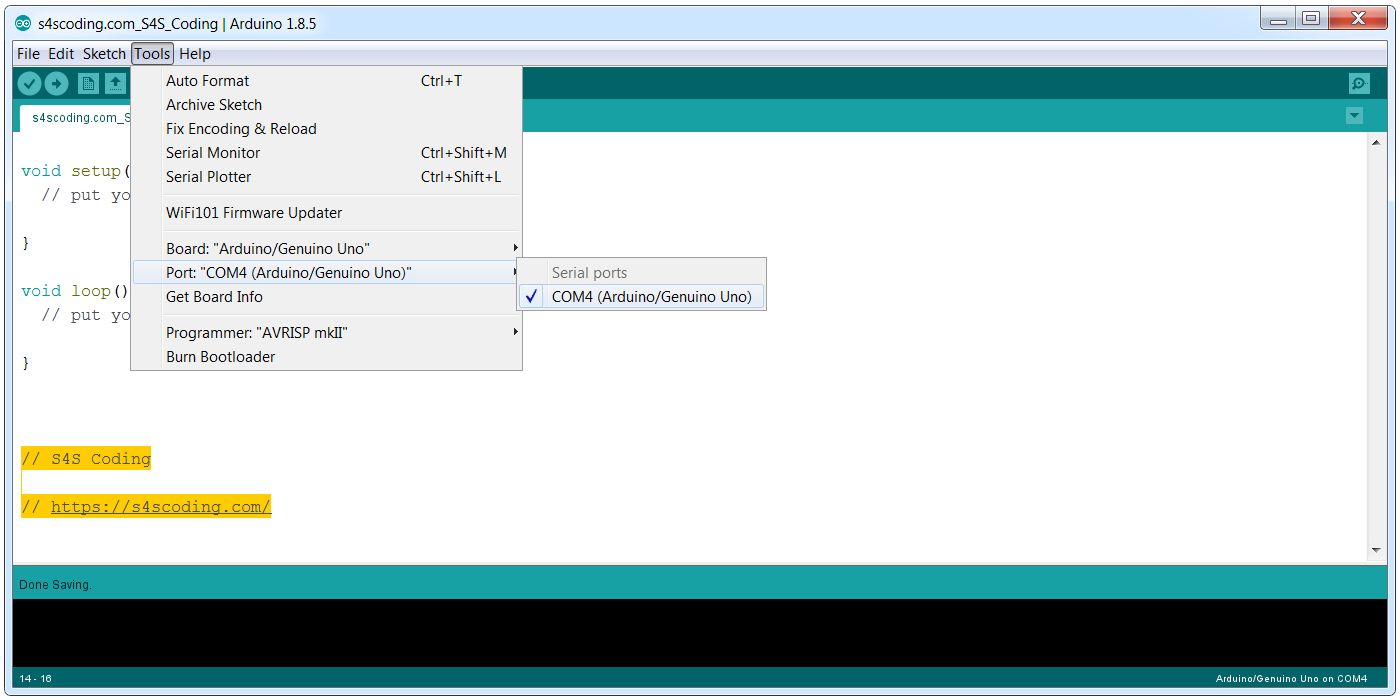
Port COM4 Arduino Genuino UNO
Although Windows has successfully installed the Arduino on COM4 (could be COM3 or another port) the Arduino IDE Software doesn’t automatically select the relevant serial port.
To select the correct port click “Tools”, hoverover ‘Port:”COM4 Arduino Genuino UNO”‘ and click “COM4 Arduino Genuino UNO”.
Continue Reading How to Download and Install the Arduino IDE Software


Connect Your Raspberry Pi to the Network #RaspberryPi...
Raspberry Pi 3 Model B+ 4 USB 2.0 Ports #RaspberryPi...
Nybble Cat Robot ...
Google Blockly Games Maze 8 Solution #Blockly #Javascript #Coding...
Start a Code Club in Your School @CodeClub #Coding #Teachers #School...
Google Coding for Boys: A simple Google image search for 'Coding for Boys' shows lots...